Introduction
It feels like every major tech company is suddenly racing to build their own AI agent management software. Just a few days ago, Meta dropped Muse Code, A massive push into terminal-based coding agents. Now, Spotify has unveiled Xirp. Watching these rapid-fire releases, one thing becomes crystal clear:
The real problem is no longer about code generation.
We already have models that can write functional code. What we don’t have is a way to manage the chaos when we actually try to use them at scale. The true bottleneck developers face right now is context loss.
If you live in the terminal like I do, you already know the pain. You run a session in Claude Code, maybe spin up Gemini CLI for a different task, and every single time, the AI starts with amnesia. It doesn’t know why you structured the API that way last week, it doesn’t know who owns the upstream service, and it definitely doesn’t know what your other agents just finished doing.
We don’t need smarter code generators anymore. We need orchestration. We need a way to share context across agents, sessions, and teams without being forced out of our command-line workflows.
And ironically, the tool that finally gets this right is a desktop app built by Spotify.
The Elephant in the Room: The Desktop App
I’ll be honest: I am a terminal guy. I prefer typing simple text commands over clicking around in heavy, complicated desktop apps. So, when I saw that Xirp was a standalone app, I was skeptical.
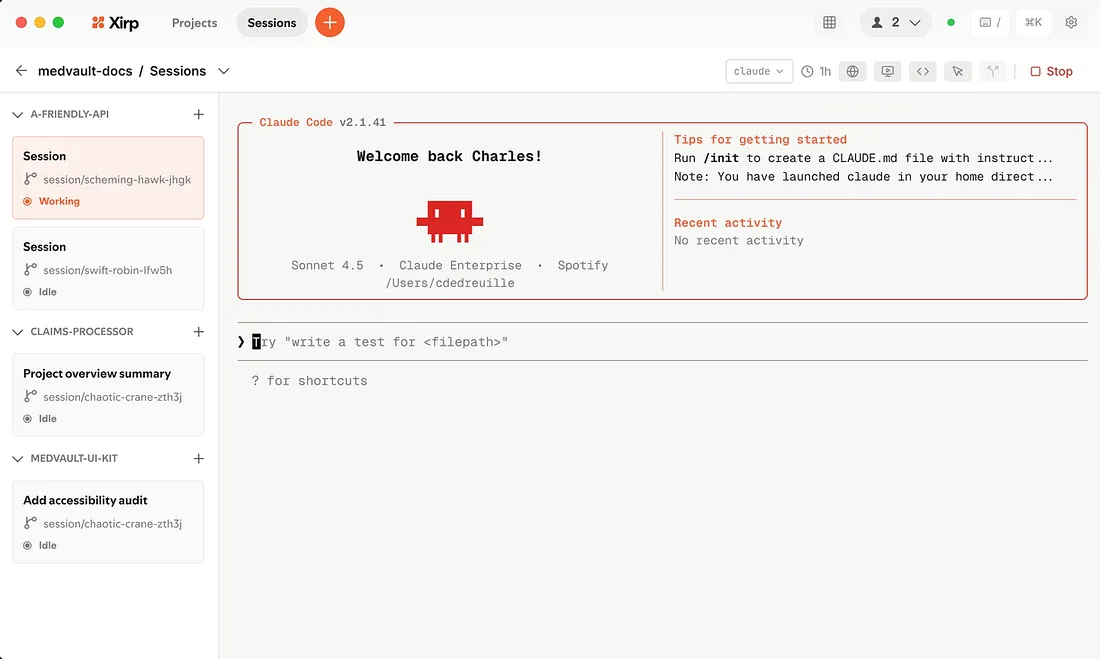
But here is the good news: Xirp doesn’t try to change how you code. Think of it like a master control panel for your AI helpers. If you try to use three different AIs at the same time right now, you end up with a messy screen full of confusing black windows. Xirp simply runs all those AIs in the background and gives you one neat, clean window to manage them. You still get to type your commands like usual, but you don’t have the headache of juggling a dozen open screens at once.
The Real Fix: Shared Memory and Teamwork
The absolute best thing about Xirp is how it handles memory.
Right now, most AI coding tools suffer from instant amnesia. If you start a new chat or switch from one AI tool to another, the new AI has no idea what you did five minutes ago. You have to waste time re-explaining your project, pasting code back in, and setting up the rules all over again.
Xirp fixes this by acting as a shared brain:
- No More AI Amnesia: The memory of what you’re building stays inside Xirp, not locked inside a specific AI tool. Say you are deep in a coding session using Claude Code in your terminal, and suddenly your usage limit hits a wall. Instead of starting all over again from scratch in another tool, you can just hand the task off to Gemini CLI. The new AI immediately knows the context and picks up right where Claude left off.
- Pick the Best Tool for the Job: Since the project’s memory lives in Xirp, you aren’t trapped using just one company’s AI. You can switch models mid-task, pick cheaper options for simpler code, or use specialized tools for different tasks — all without losing your working state.
The Big Picture: Team-Wide Memory
Sharing memory across your own AI tools is great, but Xirp goes a step further when connected to Spotify Portal — Spotify’s tool that maps out how all their software fits together.
Think of Portal as a shared map and rulebook for your whole team. Here is how it helps:
- The Big Picture: Instead of looking at just the files on your laptop, the AI sees how your project fits into the whole company. It learns who owns what and follows team rules before typing a single line of code.
- Automatic Documentation: Nobody likes writing documentation. When a session ends, Xirp automatically saves everything the AI learned back into Portal.
- Passing the Baton: When a teammate picks up the project later, their AI instantly inherits that saved context. No one has to waste hours digging through old messages to understand what was done.
Instead of working in a vacuum, your AI becomes a true team player.
Conclusion: The Future is Orchestration
If there is one major takeaway from the launch of Spotify Xirp, it is this: raw AI intelligence is no longer the main hurdle. We already have models that can write great code. The real frontier for developers right now is figuring out how to orchestrate these AI agents and automate workflows without everything breaking down.
For those of us who prefer to stay in the terminal, Xirp proves that we don’t need to sacrifice our workflows to get these agents working together. It acts as an invisible bridge, quietly handling the context sharing in the background so we can just focus on building. It is a massive step forward for anyone looking to connect their tools and scale AI development without the chaos.
Want to see it for yourself?
Xirp is currently in closed beta. You can read more about how it works and join the waitlist at xirp.spotify.com.